> ## Documentation Index
> Fetch the complete documentation index at: https://docs.uzolabs.xyz/llms.txt
> Use this file to discover all available pages before exploring further.
# Build your first dApp
> Read and write your BOT Chain contract from a viem script, then from a small React page with wagmi.
In this guide you talk to the `Counter` contract you deployed in the [quickstart](/get-started/quickstart), first from a Node.js script and then from a web page where anyone with a wallet can increment it.
Everything on this page uses **testnet** (chain 968). Get free test tokens from the [faucet](https://faucet.botchain.ai/basic).
## What you'll build
* A script that reads the counter and sends an `increment` transaction with [viem](https://viem.sh).
* A React page built with [wagmi](https://wagmi.sh) that connects a browser wallet, shows the counter and has an **Increment** button.
BOT Chain is not in viem's built-in chain list, so you'll define it yourself with `defineChain`. That way you see every value your app depends on. In your own projects you can import `botChainTestnet` from the [Uzo SDK](/sdk/overview) instead.
## Prerequisites
* A deployed `Counter` contract and its address, from the [quickstart](/get-started/quickstart).
* The `uzo-dev` wallet from the quickstart, with some tBOT in it.
* [Node.js](https://nodejs.org) 20.6 or later. This guide was tested with Node.js 24, viem 2.57 and wagmi 3.7.
* For part 2, a browser wallet such as MetaMask with BOT Chain testnet added. See [Connect a wallet](/get-started/bot-chain/connect-wallet).
## Part 1: a viem script
```bash theme={"dark"}
mkdir counter-script
cd counter-script
npm init -y
npm pkg set type=module
npm install viem
```
This tells viem everything it needs to know about BOT Chain testnet.
```js chain.js theme={"dark"}
import { defineChain } from "viem";
export const botChainTestnet = defineChain({
id: 968,
name: "BOT Chain Testnet",
nativeCurrency: { name: "BOT", symbol: "tBOT", decimals: 18 },
rpcUrls: {
default: { http: ["https://rpc.bohr.life"] },
},
blockExplorers: {
default: {
name: "BOTScan",
url: "https://scan.bohr.life",
apiUrl: "https://scan.bohr.life/api",
},
},
contracts: {
multicall3: {
address: "0x47FA21f684bBAD707A53a0f9BE59F1422F46C265",
},
},
testnet: true,
});
```
The `multicall3` address is the one BOT Chain deploys on both networks. Viem uses it to batch reads. The usual Multicall3 address used on other chains is not deployed on testnet, so don't skip this field.
The ABI tells viem which functions the contract has. Foundry wrote the full ABI to `out/Counter.sol/Counter.json` in your quickstart project. For this guide you only need these three functions:
```js counter.js theme={"dark"}
export const counterAbi = [
{
type: "function",
name: "number",
inputs: [],
outputs: [{ name: "", type: "uint256" }],
stateMutability: "view",
},
{
type: "function",
name: "increment",
inputs: [],
outputs: [],
stateMutability: "nonpayable",
},
{
type: "function",
name: "setNumber",
inputs: [{ name: "newNumber", type: "uint256" }],
outputs: [],
stateMutability: "nonpayable",
},
];
```
The script reads your contract address and private key from a `.env` file, so they never appear in your code.
Export the private key of your `uzo-dev` testnet wallet. Cast asks for the keystore password:
```bash theme={"dark"}
cast wallet decrypt-keystore uzo-dev
```
Create a file named `.env` and paste in your values:
```bash .env theme={"dark"}
COUNTER_ADDRESS=0xYourCounterAddress
PRIVATE_KEY=0xYourTestnetPrivateKey
```
Only ever put a **testnet** key in a `.env` file. Add `.env` to your `.gitignore` before your first commit, so the key never reaches GitHub:
```bash theme={"dark"}
echo ".env" >> .gitignore
```
A public client reads from the chain. Reading is free and doesn't need a wallet.
```js read.js theme={"dark"}
import { createPublicClient, http } from "viem";
import { botChainTestnet } from "./chain.js";
import { counterAbi } from "./counter.js";
const client = createPublicClient({
chain: botChainTestnet,
transport: http(),
});
const blockNumber = await client.getBlockNumber();
console.log("Latest block:", blockNumber);
const number = await client.readContract({
address: process.env.COUNTER_ADDRESS,
abi: counterAbi,
functionName: "number",
});
console.log("Counter value:", number);
```
Run it. The `--env-file` flag loads your `.env` file:
```bash theme={"dark"}
node --env-file=.env read.js
```
```text Output theme={"dark"}
Latest block: 25377855n
Counter value: 1n
```
Your block number will be higher. The `n` means the value is a JavaScript `BigInt`.
A wallet client signs and sends transactions with your key.
```js write.js theme={"dark"}
import { createPublicClient, createWalletClient, http } from "viem";
import { privateKeyToAccount } from "viem/accounts";
import { botChainTestnet } from "./chain.js";
import { counterAbi } from "./counter.js";
const account = privateKeyToAccount(process.env.PRIVATE_KEY);
const publicClient = createPublicClient({
chain: botChainTestnet,
transport: http(),
});
const walletClient = createWalletClient({
account,
chain: botChainTestnet,
transport: http(),
});
const hash = await walletClient.writeContract({
address: process.env.COUNTER_ADDRESS,
abi: counterAbi,
functionName: "increment",
});
console.log("Sent:", `${botChainTestnet.blockExplorers.default.url}/tx/${hash}`);
const receipt = await publicClient.waitForTransactionReceipt({ hash });
console.log("Status:", receipt.status, "in block", receipt.blockNumber);
const number = await publicClient.readContract({
address: process.env.COUNTER_ADDRESS,
abi: counterAbi,
functionName: "number",
});
console.log("Counter value:", number);
```
```bash theme={"dark"}
node --env-file=.env write.js
```
The script prints a BOTScan link, waits about a second for the block, then prints the new value:
```text Output theme={"dark"}
Sent: https://scan.bohr.life/tx/0xb17abcc5797a77a3a9de68ff5d9d2b7654af5b810fbedfc7e658ee063074b5a0
Status: success in block 25395524n
Counter value: 2n
```
## Part 2: a wagmi page
Now give the contract a user interface. Visitors connect their own wallet, so this app needs no private key.
```bash theme={"dark"}
npm create vite@latest counter-web -- --template react-ts
cd counter-web
npm install
npm install wagmi viem @tanstack/react-query
```
This file defines the chain (the same values as `chain.js`) and creates the wagmi config. The `injected` connector works with MetaMask and other browser wallets.
```ts src/wagmi.ts theme={"dark"}
import { createConfig, http } from "wagmi";
import { injected } from "wagmi/connectors";
import { defineChain } from "viem";
export const botChainTestnet = defineChain({
id: 968,
name: "BOT Chain Testnet",
nativeCurrency: { name: "BOT", symbol: "tBOT", decimals: 18 },
rpcUrls: {
default: { http: ["https://rpc.bohr.life"] },
},
blockExplorers: {
default: {
name: "BOTScan",
url: "https://scan.bohr.life",
apiUrl: "https://scan.bohr.life/api",
},
},
contracts: {
multicall3: {
address: "0x47FA21f684bBAD707A53a0f9BE59F1422F46C265",
},
},
testnet: true,
});
export const config = createConfig({
chains: [botChainTestnet],
connectors: [injected()],
transports: {
[botChainTestnet.id]: http(),
},
});
declare module "wagmi" {
interface Register {
config: typeof config;
}
}
```
Vite exposes variables that start with `VITE_` to your frontend. A contract address is public, so it's safe here.
```bash .env.local theme={"dark"}
VITE_COUNTER_ADDRESS=0xYourCounterAddress
```
```ts src/counter.ts theme={"dark"}
export const counterAddress = import.meta.env.VITE_COUNTER_ADDRESS as `0x${string}`;
export const counterAbi = [
{
type: "function",
name: "number",
inputs: [],
outputs: [{ name: "", type: "uint256" }],
stateMutability: "view",
},
{
type: "function",
name: "increment",
inputs: [],
outputs: [],
stateMutability: "nonpayable",
},
] as const;
```
`as const` lets TypeScript check your function names and argument types.
Replace `src/main.tsx`:
```tsx src/main.tsx theme={"dark"}
import { StrictMode } from "react";
import { createRoot } from "react-dom/client";
import { WagmiProvider } from "wagmi";
import { QueryClient, QueryClientProvider } from "@tanstack/react-query";
import { config } from "./wagmi";
import App from "./App";
const queryClient = new QueryClient();
createRoot(document.getElementById("root")!).render(
,
);
```
Replace `src/App.tsx`:
```tsx src/App.tsx theme={"dark"}
import { useEffect } from "react";
import {
useConnect,
useConnection,
useConnectors,
useDisconnect,
useReadContract,
useSwitchChain,
useWaitForTransactionReceipt,
useWriteContract,
} from "wagmi";
import { botChainTestnet } from "./wagmi";
import { counterAbi, counterAddress } from "./counter";
import "./App.css";
const short = (a: string) => `${a.slice(0, 6)}...${a.slice(-4)}`;
export default function App() {
const { address, chainId, isConnected } = useConnection();
const connectors = useConnectors();
const connect = useConnect();
const disconnect = useDisconnect();
const switchChain = useSwitchChain();
// Wallets that announce themselves (MetaMask, Rabby and so on) show up by name.
// The generic "Injected" connector is only a fallback for wallets that don't.
const named = connectors.filter((c) => c.id !== "injected");
const wallets = named.length > 0 ? named : connectors;
const { data: number, refetch } = useReadContract({
address: counterAddress,
abi: counterAbi,
functionName: "number",
chainId: botChainTestnet.id,
});
const write = useWriteContract();
const receipt = useWaitForTransactionReceipt({ hash: write.data });
useEffect(() => {
if (receipt.isSuccess) refetch();
}, [receipt.isSuccess, refetch]);
const onTestnet = chainId === botChainTestnet.id;
return (
BOT Chain testnet
{isConnected && address && (
)}
}
);
}
```
Most browser wallets announce themselves to the page, so wagmi lists each one by name with its icon. If you have two wallets installed, you see two buttons. The generic `injected` connector from `wagmi.ts` only shows, as **Connect wallet**, when no wallet announces itself.
Replace `src/App.css` to style the page:
```css src/App.css theme={"dark"}
body {
margin: 0;
min-height: 100vh;
display: grid;
place-items: center;
background: radial-gradient(circle at top, #2a2112, #0e0d0b 60%);
color: #f4efe6;
font-family: system-ui, sans-serif;
}
.card {
width: min(360px, calc(100vw - 32px));
padding: 24px;
border: 1px solid #3a3122;
border-radius: 20px;
background: #17150f;
box-shadow: 0 20px 60px rgb(0 0 0 / 0.5);
display: flex;
flex-direction: column;
gap: 12px;
}
header {
display: flex;
justify-content: space-between;
align-items: center;
margin-bottom: 12px;
}
.badge {
font-size: 12px;
padding: 4px 10px;
border-radius: 999px;
background: #2e2615;
color: #e8bf6a;
}
.label {
margin: 0;
color: #a39a8a;
font-size: 14px;
}
.value {
margin: 0 0 12px;
font-size: 72px;
font-weight: 700;
line-height: 1;
font-variant-numeric: tabular-nums;
}
button {
font: inherit;
cursor: pointer;
}
.primary {
display: flex;
align-items: center;
justify-content: center;
gap: 8px;
padding: 12px;
border: 0;
border-radius: 12px;
background: #d9a441;
color: #17150f;
font-weight: 600;
}
.primary:hover:not(:disabled) {
background: #e8bf6a;
}
.primary:disabled {
opacity: 0.6;
cursor: wait;
}
.primary img {
width: 20px;
height: 20px;
}
.link {
padding: 0;
border: 0;
background: none;
color: #e8bf6a;
font-size: 13px;
text-align: center;
}
.error {
margin: 0;
color: #f07a6a;
font-size: 13px;
}
footer {
margin-top: 8px;
color: #6f685c;
font-size: 12px;
text-align: center;
}
```
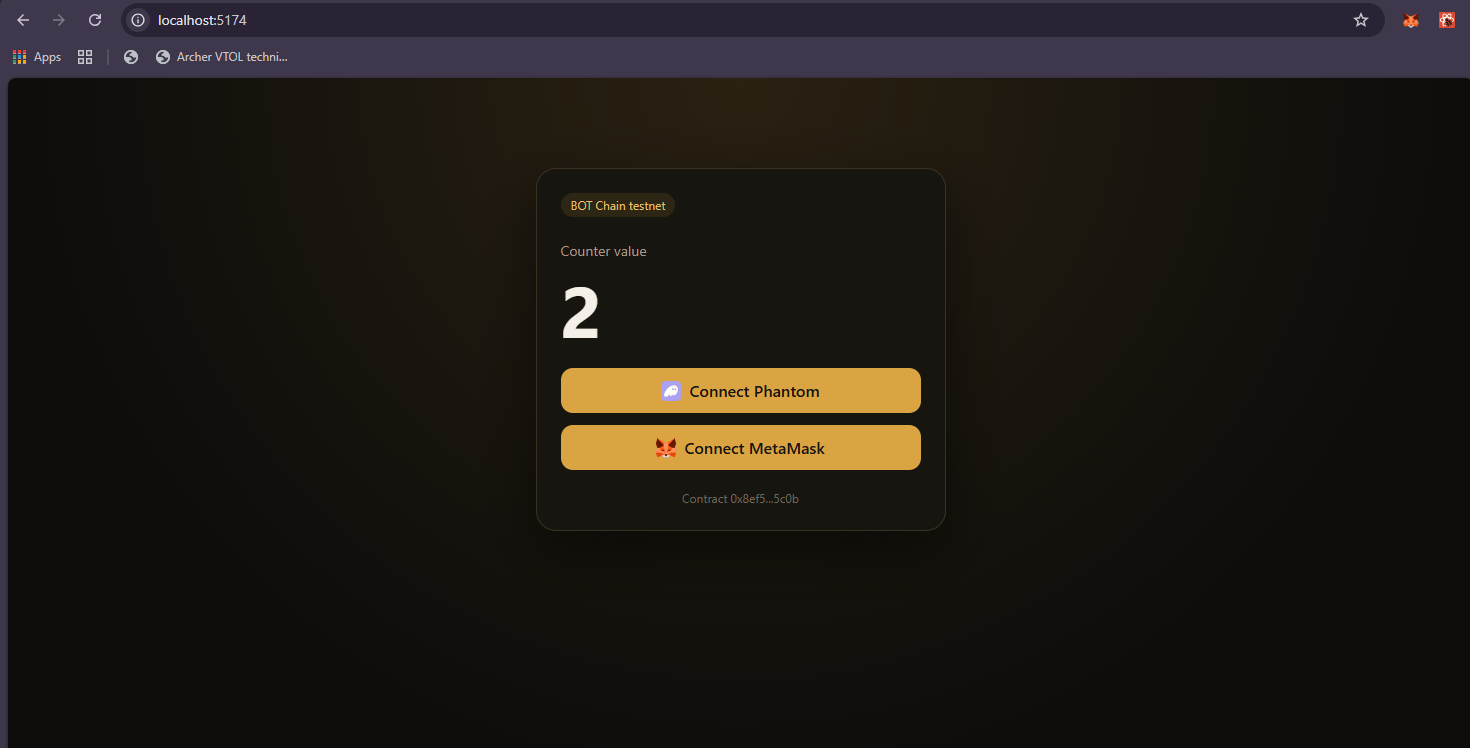
The page reads the counter through the public RPC, so it shows the value before anyone connects. Writing needs a connected wallet on chain 968.
```bash theme={"dark"}
npm run dev
```
Open the local URL that Vite prints, usually `http://localhost:5173`.
## Verify it worked
1. The page shows the same counter value that `read.js` printed.
2. Click **Connect** with your wallet's name, then approve in your wallet.
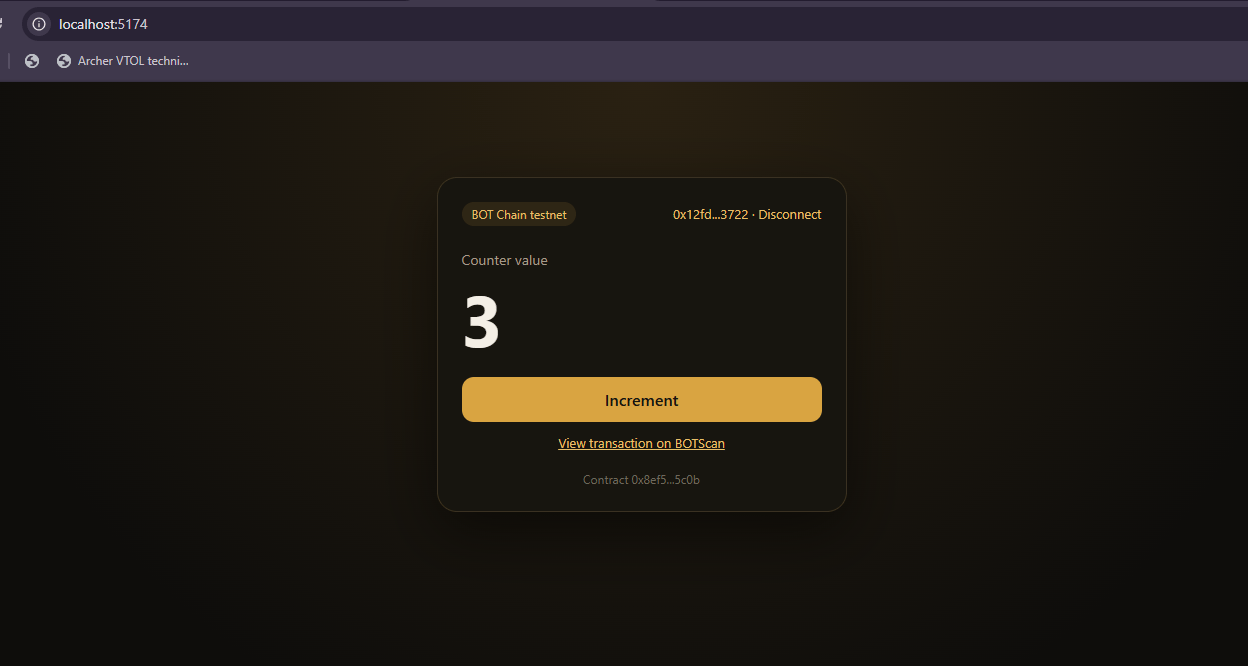
3. Click **Increment** and confirm. After about a second the value goes up by one.
4. The **View transaction on BOTScan** link opens your transaction.
## Troubleshooting
The script couldn't find `COUNTER_ADDRESS`. Run it with `node --env-file=.env`, and check that `.env` is in the folder you're running from. In the React app, restart `npm run dev` after creating `.env.local`, and check that the name starts with `VITE_`.
There is no `Counter` contract at that address on testnet. Check that you copied the `Deployed to` address from the quickstart, not your wallet address or the transaction hash.
`PRIVATE_KEY` must be 64 hex characters with a `0x` prefix. Copy it again from `cast wallet decrypt-keystore uzo-dev`.
That button is the generic `injected` connector, which needs a browser wallet extension. Without one, the button still appears but nothing happens when you click it. Install MetaMask or another EVM wallet and reload the page.
Click **Switch to BOT Chain testnet**. If your wallet doesn't know chain 968 yet, add it first using the values in [Connect a wallet](/get-started/bot-chain/connect-wallet).
## Next steps
Configure wagmi for both networks in a real project.
Show contract history on BOT Chain.
Gas, errors and confirmations in more depth.
Every chain value in one table.
This documentation is built and hosted on [Mintlify](https://mintlify.com), a developer documentation platform.
 Replace `src/App.css` to style the page:
```css src/App.css theme={"dark"}
body {
margin: 0;
min-height: 100vh;
display: grid;
place-items: center;
background: radial-gradient(circle at top, #2a2112, #0e0d0b 60%);
color: #f4efe6;
font-family: system-ui, sans-serif;
}
.card {
width: min(360px, calc(100vw - 32px));
padding: 24px;
border: 1px solid #3a3122;
border-radius: 20px;
background: #17150f;
box-shadow: 0 20px 60px rgb(0 0 0 / 0.5);
display: flex;
flex-direction: column;
gap: 12px;
}
header {
display: flex;
justify-content: space-between;
align-items: center;
margin-bottom: 12px;
}
.badge {
font-size: 12px;
padding: 4px 10px;
border-radius: 999px;
background: #2e2615;
color: #e8bf6a;
}
.label {
margin: 0;
color: #a39a8a;
font-size: 14px;
}
.value {
margin: 0 0 12px;
font-size: 72px;
font-weight: 700;
line-height: 1;
font-variant-numeric: tabular-nums;
}
button {
font: inherit;
cursor: pointer;
}
.primary {
display: flex;
align-items: center;
justify-content: center;
gap: 8px;
padding: 12px;
border: 0;
border-radius: 12px;
background: #d9a441;
color: #17150f;
font-weight: 600;
}
.primary:hover:not(:disabled) {
background: #e8bf6a;
}
.primary:disabled {
opacity: 0.6;
cursor: wait;
}
.primary img {
width: 20px;
height: 20px;
}
.link {
padding: 0;
border: 0;
background: none;
color: #e8bf6a;
font-size: 13px;
text-align: center;
}
.error {
margin: 0;
color: #f07a6a;
font-size: 13px;
}
footer {
margin-top: 8px;
color: #6f685c;
font-size: 12px;
text-align: center;
}
```
The page reads the counter through the public RPC, so it shows the value before anyone connects. Writing needs a connected wallet on chain 968.
Replace `src/App.css` to style the page:
```css src/App.css theme={"dark"}
body {
margin: 0;
min-height: 100vh;
display: grid;
place-items: center;
background: radial-gradient(circle at top, #2a2112, #0e0d0b 60%);
color: #f4efe6;
font-family: system-ui, sans-serif;
}
.card {
width: min(360px, calc(100vw - 32px));
padding: 24px;
border: 1px solid #3a3122;
border-radius: 20px;
background: #17150f;
box-shadow: 0 20px 60px rgb(0 0 0 / 0.5);
display: flex;
flex-direction: column;
gap: 12px;
}
header {
display: flex;
justify-content: space-between;
align-items: center;
margin-bottom: 12px;
}
.badge {
font-size: 12px;
padding: 4px 10px;
border-radius: 999px;
background: #2e2615;
color: #e8bf6a;
}
.label {
margin: 0;
color: #a39a8a;
font-size: 14px;
}
.value {
margin: 0 0 12px;
font-size: 72px;
font-weight: 700;
line-height: 1;
font-variant-numeric: tabular-nums;
}
button {
font: inherit;
cursor: pointer;
}
.primary {
display: flex;
align-items: center;
justify-content: center;
gap: 8px;
padding: 12px;
border: 0;
border-radius: 12px;
background: #d9a441;
color: #17150f;
font-weight: 600;
}
.primary:hover:not(:disabled) {
background: #e8bf6a;
}
.primary:disabled {
opacity: 0.6;
cursor: wait;
}
.primary img {
width: 20px;
height: 20px;
}
.link {
padding: 0;
border: 0;
background: none;
color: #e8bf6a;
font-size: 13px;
text-align: center;
}
.error {
margin: 0;
color: #f07a6a;
font-size: 13px;
}
footer {
margin-top: 8px;
color: #6f685c;
font-size: 12px;
text-align: center;
}
```
The page reads the counter through the public RPC, so it shows the value before anyone connects. Writing needs a connected wallet on chain 968.
 1. The page shows the same counter value that `read.js` printed.
2. Click **Connect** with your wallet's name, then approve in your wallet.
3. Click **Increment** and confirm. After about a second the value goes up by one.
4. The **View transaction on BOTScan** link opens your transaction.
## Troubleshooting
1. The page shows the same counter value that `read.js` printed.
2. Click **Connect** with your wallet's name, then approve in your wallet.
3. Click **Increment** and confirm. After about a second the value goes up by one.
4. The **View transaction on BOTScan** link opens your transaction.
## Troubleshooting