> ## Documentation Index
> Fetch the complete documentation index at: https://docs.uzolabs.xyz/llms.txt
> Use this file to discover all available pages before exploring further.
# Quickstart
> Deploy and verify your first smart contract on BOT Chain testnet in under 15 minutes using Foundry.
In this quickstart you deploy a smart contract to BOT Chain testnet, verify its source code on BOTScan and call it from your terminal. It takes about 15 minutes and needs nothing from Uzo, so it works today.
Everything on this page uses **testnet** (chain 968). Get free test tokens from the [faucet](https://faucet.botchain.ai/basic).
## What you'll build
You'll build a `Counter` contract that stores a number. You can increment the number and read it back. You will:
1. Create a wallet that lives only on your machine.
2. Fund it with free test tokens.
3. Deploy the contract with [Foundry](https://getfoundry.sh).
4. Verify the source on [BOTScan](https://scan.bohr.life).
5. Send a transaction and read the result.
## Prerequisites
* A terminal. On Windows, use [WSL](https://learn.microsoft.com/windows/wsl/install) or Git Bash, because the Foundry installer needs a Unix shell.
* [Git](https://git-scm.com/downloads), which `forge init` uses.
* About 15 minutes.
You don't need MetaMask for this page. If you want to see your balance in a browser wallet later, follow [Connect a wallet](/get-started/bot-chain/connect-wallet).
## Steps
Install `foundryup`, then use it to install `forge`, `cast` and `anvil`.
```bash theme={"dark"}
curl -L https://foundry.paradigm.xyz | bash
```
Open a new terminal so your `PATH` updates, then run:
```bash theme={"dark"}
foundryup
```
Check that it worked:
```bash theme={"dark"}
forge --version
```
These docs were tested with Foundry 1.8.3. Any later 1.x version should work.
Create a new key and save it as an encrypted keystore named `uzo-dev`. Cast asks you for a password. Pick one you'll remember, because you'll type it each time you send a transaction.
```bash theme={"dark"}
cast wallet new uzo-dev
```
The keystore is saved in `~/.foundry/keystores/uzo-dev`. Cast prints your new address. You can print it again at any time:
```bash theme={"dark"}
cast wallet address --account uzo-dev
```
Use this wallet for testnet only. Never send real funds to a key you created for testing, and never paste a private key into a file you might commit.
1. Open the [BOT Chain faucet](https://faucet.botchain.ai/basic).
2. Paste your address, complete the check and claim.
3. Wait a few seconds, then check your balance:
```bash theme={"dark"}
cast balance --ether YOUR_ADDRESS --rpc-url https://rpc.bohr.life
```
Replace `YOUR_ADDRESS` with the address from the last step. You should see `10.000000000000000000`. The faucet gives each address up to 10 tBOT every 24 hours, which is far more than this quickstart uses. If the BOT Chain faucet doesn't work for you, the [Uzo Labs faucet](https://www.uzolabs.xyz/faucet) gives 0.1 tBOT, which is enough for this quickstart. See [Get testnet tokens](/get-started/bot-chain/get-testnet-tokens) if nothing arrives.
```bash theme={"dark"}
forge init hello-bot
cd hello-bot
```
This creates `src/Counter.sol`, a test in `test/Counter.t.sol` and a deploy script in `script/`. The contract looks like this:
```solidity src/Counter.sol theme={"dark"}
// SPDX-License-Identifier: UNLICENSED
pragma solidity ^0.8.13;
contract Counter {
uint256 public number;
function setNumber(uint256 newNumber) public {
number = newNumber;
}
function increment() public {
number++;
}
}
```
Replace the contents of `foundry.toml` with this:
```toml foundry.toml theme={"dark"}
[profile.default]
src = "src"
out = "out"
libs = ["lib"]
evm_version = "cancun"
[rpc_endpoints]
bot_testnet = "https://rpc.bohr.life"
bot_mainnet = "https://rpc.botchain.ai"
```
`evm_version = "cancun"` matters. Newer Solidity compilers can target upgrades that BOT Chain doesn't support yet. See [Supported EIPs](/get-started/bot-chain/supported-eips).
Build and run the tests:
```bash theme={"dark"}
forge build
forge test
```
Both tests should pass.
```bash theme={"dark"}
forge create src/Counter.sol:Counter --rpc-url bot_testnet --account uzo-dev --broadcast
```
Enter your keystore password when asked. The output ends like this, with your own addresses and hash:
```text theme={"dark"}
Deployer: 0xEc526474F4F9De027942d5f7118A9613266B0C4c
Deployed to: 0x8ef544af3CE913Bb5eC12ba2F34fe7FA29225c0b
Transaction hash: 0xccc49942d944c87f72490f4337c09957a0613ab202e5f633c6bfa1d3a6e8c26e
```
Deploying `Counter` and calling it once cost about 0.004 tBOT when we tested on 2026-10-02.
Copy the `Deployed to` address and save it in a shell variable so the next steps can use it:
```bash theme={"dark"}
export COUNTER=PASTE_DEPLOYED_ADDRESS_HERE
```
BOTScan runs on Blockscout, so use Foundry's Blockscout verifier. No API key is needed.
```bash theme={"dark"}
forge verify-contract $COUNTER src/Counter.sol:Counter \
--chain 968 \
--verifier blockscout \
--verifier-url https://scan.bohr.life/api/ \
--watch
```
`--watch` makes Foundry wait for the result. Verification usually finishes in a few seconds. The output ends like this:
```text theme={"dark"}
Contract verification status:
Response: `OK`
Details: `Pass - Verified`
Contract successfully verified
```
If Foundry says the contract `is already verified`, that's fine. BOTScan verifies a contract automatically when its bytecode matches one that's already verified, which often happens with the default `Counter`.
Send a transaction that increments the counter:
```bash theme={"dark"}
cast send $COUNTER "increment()" --rpc-url bot_testnet --account uzo-dev
```
Then read the value back. Reads are free and need no wallet:
```bash theme={"dark"}
cast call $COUNTER "number()(uint256)" --rpc-url bot_testnet
```
It prints `1`.
## Verify it worked
Open your contract on BOTScan. Replace the address at the end of this URL with yours:
```text theme={"dark"}
https://scan.bohr.life/address/PASTE_DEPLOYED_ADDRESS_HERE
```
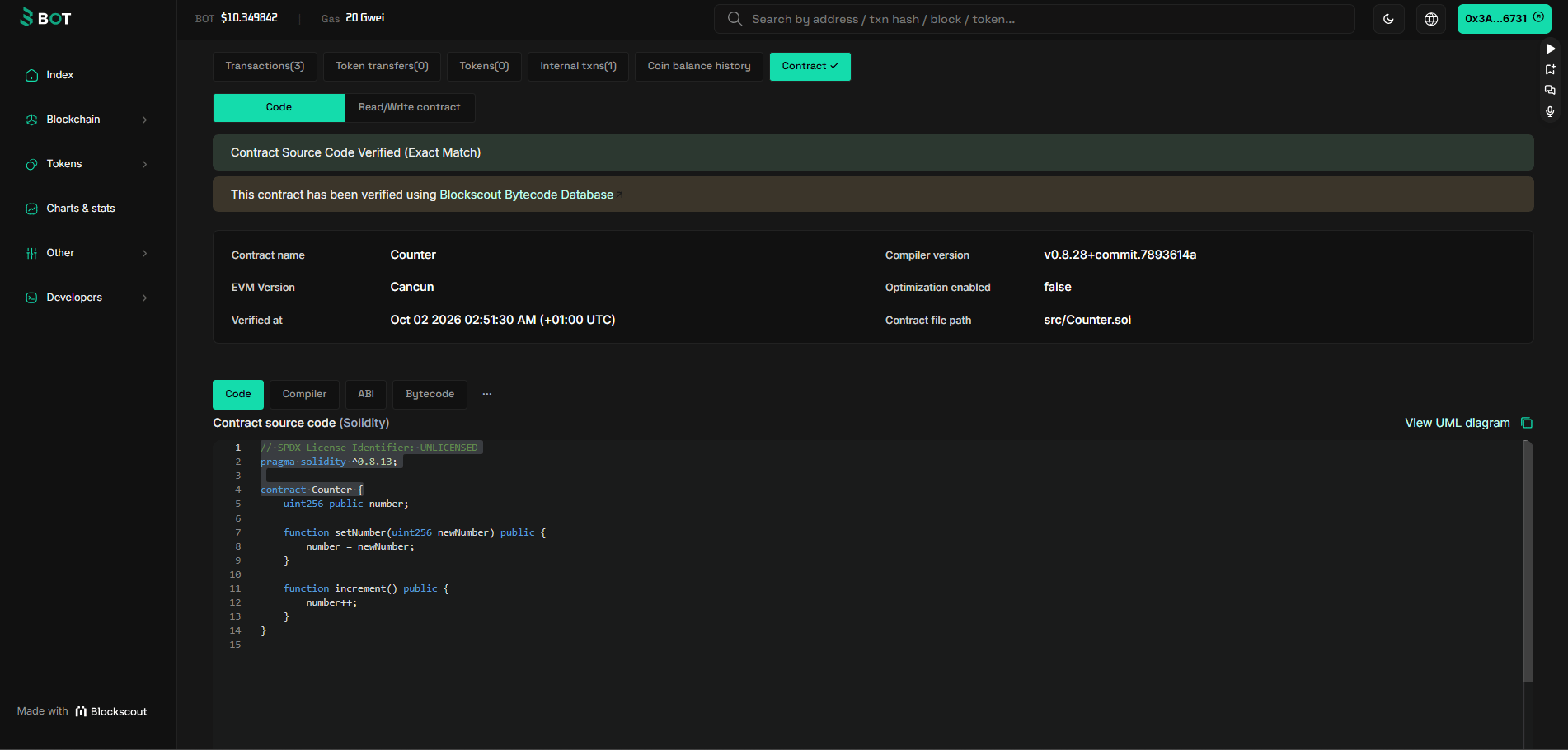 You should see:
* A green check next to **Contract**, which means the source is verified.
* On the **Contract** tab, a **Contract Source Code Verified** banner, the contract name `Counter` and your source code.
* Under **Transactions**, the deployment and your `increment` call.
* Under **Read/Write contract**, `number` reads `1`.
## Troubleshooting
Your wallet has no tBOT on testnet. Check the balance with `cast balance --ether YOUR_ADDRESS --rpc-url https://rpc.bohr.life`, then claim from the [faucet](https://faucet.botchain.ai/basic). Make sure you claimed for the same address that `cast wallet address --account uzo-dev` prints.
Your compiler targeted an EVM upgrade newer than BOT Chain supports. Set `evm_version = "cancun"` in `foundry.toml`, run `forge clean`, then build and deploy again.
Foundry only simulates unless you pass `--broadcast`. Run the command again with `--broadcast` at the end.
The explorer may not have indexed the deployment yet. Wait 10 to 20 seconds and run `forge verify-contract` again. Check that you used the address from `Deployed to`, not the transaction hash, and that `--verifier-url` ends in `/api/`.
`--account uzo-dev` looks in `~/.foundry/keystores/`. Run `cast wallet list` to see the names you have. If you forgot the password, create a new wallet and claim from the faucet again.
Run the installer inside WSL or Git Bash, not PowerShell or Command Prompt. Open a new terminal after installing so `foundryup` is on your `PATH`.
More errors and fixes are in [Troubleshooting](/reference/troubleshooting).
## Next steps
Read and write this contract from JavaScript and a web page.
A fuller Foundry setup for real projects.
Add BOT Chain to MetaMask.
What works differently on BOT Chain.
This documentation is built and hosted on [Mintlify](https://mintlify.com), a developer documentation platform.
You should see:
* A green check next to **Contract**, which means the source is verified.
* On the **Contract** tab, a **Contract Source Code Verified** banner, the contract name `Counter` and your source code.
* Under **Transactions**, the deployment and your `increment` call.
* Under **Read/Write contract**, `number` reads `1`.
## Troubleshooting
Your wallet has no tBOT on testnet. Check the balance with `cast balance --ether YOUR_ADDRESS --rpc-url https://rpc.bohr.life`, then claim from the [faucet](https://faucet.botchain.ai/basic). Make sure you claimed for the same address that `cast wallet address --account uzo-dev` prints.
Your compiler targeted an EVM upgrade newer than BOT Chain supports. Set `evm_version = "cancun"` in `foundry.toml`, run `forge clean`, then build and deploy again.
Foundry only simulates unless you pass `--broadcast`. Run the command again with `--broadcast` at the end.
The explorer may not have indexed the deployment yet. Wait 10 to 20 seconds and run `forge verify-contract` again. Check that you used the address from `Deployed to`, not the transaction hash, and that `--verifier-url` ends in `/api/`.
`--account uzo-dev` looks in `~/.foundry/keystores/`. Run `cast wallet list` to see the names you have. If you forgot the password, create a new wallet and claim from the faucet again.
Run the installer inside WSL or Git Bash, not PowerShell or Command Prompt. Open a new terminal after installing so `foundryup` is on your `PATH`.
More errors and fixes are in [Troubleshooting](/reference/troubleshooting).
## Next steps
Read and write this contract from JavaScript and a web page.
A fuller Foundry setup for real projects.
Add BOT Chain to MetaMask.
What works differently on BOT Chain.
This documentation is built and hosted on [Mintlify](https://mintlify.com), a developer documentation platform.