

What you’ll build
You’ll build aCounter contract that stores a number. You can increment the number and read it back. You will:
- Create a wallet that lives only on your machine.
- Fund it with free test tokens.
- Deploy the contract with Foundry.
- Verify the source on BOTScan.
- Send a transaction and read the result.
Prerequisites
- A terminal. On Windows, use WSL or Git Bash, because the Foundry installer needs a Unix shell.
- Git, which
forge inituses. - About 15 minutes.
Steps
1
Install Foundry
Install Open a new terminal so your Check that it worked:These docs were tested with Foundry 1.8.3. Any later 1.x version should work.
foundryup, then use it to install forge, cast and anvil.PATH updates, then run:2
Create a wallet
Create a new key and save it as an encrypted keystore named The keystore is saved in
uzo-dev. Cast asks you for a password. Pick one you’ll remember, because you’ll type it each time you send a transaction.~/.foundry/keystores/uzo-dev. Cast prints your new address. You can print it again at any time:3
Get test tokens
- Open the BOT Chain faucet.
- Paste your address, complete the check and claim.
- Wait a few seconds, then check your balance:
YOUR_ADDRESS with the address from the last step. You should see 10.000000000000000000. The faucet gives each address up to 10 tBOT every 24 hours, which is far more than this quickstart uses. If the BOT Chain faucet doesn’t work for you, the Uzo Labs faucet gives 0.1 tBOT, which is enough for this quickstart. See Get testnet tokens if nothing arrives.4
Create a project
src/Counter.sol, a test in test/Counter.t.sol and a deploy script in script/. The contract looks like this:src/Counter.sol
5
Point Foundry at BOT Chain
Replace the contents of Both tests should pass.
foundry.toml with this:foundry.toml
evm_version = "cancun" matters. Newer Solidity compilers can target upgrades that BOT Chain doesn’t support yet. See Supported EIPs.Build and run the tests:6
Deploy the contract
Counter and calling it once cost about 0.004 tBOT when we tested on 2026-10-02.Copy the Deployed to address and save it in a shell variable so the next steps can use it:7
Verify the source on BOTScan
BOTScan runs on Blockscout, so use Foundry’s Blockscout verifier. No API key is needed.If Foundry says the contract
--watch makes Foundry wait for the result. Verification usually finishes in a few seconds. The output ends like this:is already verified, that’s fine. BOTScan verifies a contract automatically when its bytecode matches one that’s already verified, which often happens with the default Counter.8
Call the contract
Send a transaction that increments the counter:Then read the value back. Reads are free and need no wallet:It prints
1.Verify it worked
Open your contract on BOTScan. Replace the address at the end of this URL with yours: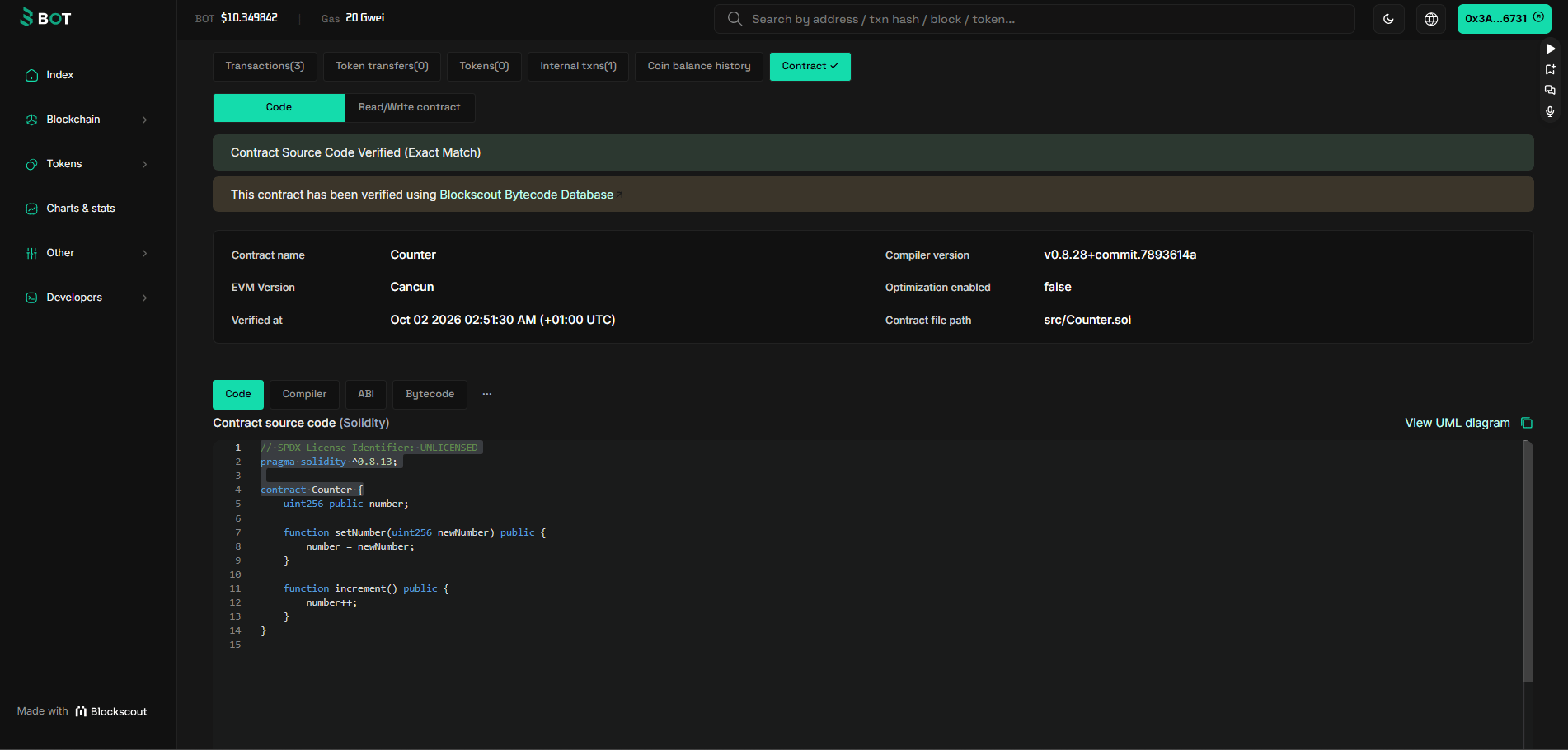
- A green check next to Contract, which means the source is verified.
- On the Contract tab, a Contract Source Code Verified banner, the contract name
Counterand your source code. - Under Transactions, the deployment and your
incrementcall. - Under Read/Write contract,
numberreads1.
Troubleshooting
insufficient funds for gas * price + value
insufficient funds for gas * price + value
Your wallet has no tBOT on testnet. Check the balance with
cast balance --ether YOUR_ADDRESS --rpc-url https://rpc.bohr.life, then claim from the faucet. Make sure you claimed for the same address that cast wallet address --account uzo-dev prints.invalid opcode or EVM error 0x1e when deploying
invalid opcode or EVM error 0x1e when deploying
Your compiler targeted an EVM upgrade newer than BOT Chain supports. Set
evm_version = "cancun" in foundry.toml, run forge clean, then build and deploy again.forge create prints the transaction but nothing is deployed
forge create prints the transaction but nothing is deployed
Foundry only simulates unless you pass
--broadcast. Run the command again with --broadcast at the end.Verification fails or says the contract is not found
Verification fails or says the contract is not found
The explorer may not have indexed the deployment yet. Wait 10 to 20 seconds and run
forge verify-contract again. Check that you used the address from Deployed to, not the transaction hash, and that --verifier-url ends in /api/.Error: keystore not found or wrong password
Error: keystore not found or wrong password
--account uzo-dev looks in ~/.foundry/keystores/. Run cast wallet list to see the names you have. If you forgot the password, create a new wallet and claim from the faucet again.curl or foundryup not found on Windows
curl or foundryup not found on Windows
Run the installer inside WSL or Git Bash, not PowerShell or Command Prompt. Open a new terminal after installing so
foundryup is on your PATH.Next steps
Build your first dApp
Read and write this contract from JavaScript and a web page.
Foundry setup
A fuller Foundry setup for real projects.
Connect a wallet
Add BOT Chain to MetaMask.
Known limitations
What works differently on BOT Chain.